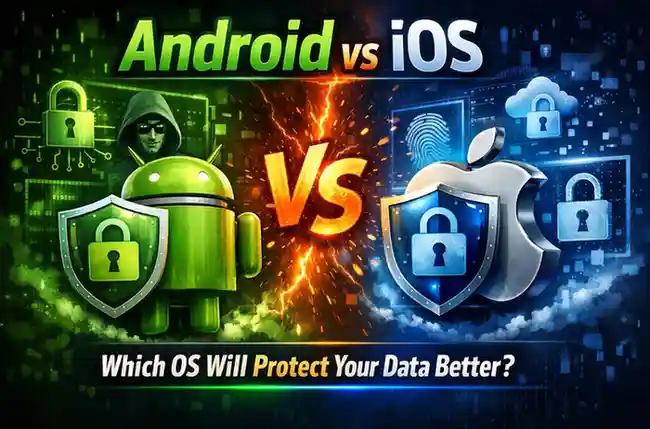
Android vs iOS: Which OS Will Protect Your Data Better?
In our hyper-connected modern world, your smartphone is essentially a digital vault. It holds your banking details, personal photos, private conversations, location history, and health data. With cyber threats becoming increasingly sophisticated, the question of who guards this vault is more critical than ever.
For over a decade, the mobile world has been dominated by two heavy weights: Google’s Android and Apple’s iOS. Both tech giants heavily market their security and privacy features, but they take fundamentally different philosophical and technical approaches to protecting your data.
So, which operating system will actually protect your data better? Let’s dive deep into the architecture, business models, and security features of both platforms to find out.
Table of Contents
The Apple Approach: The “Walled Garden” of iOS
Apple has built its reputation on privacy, famously declaring it a “fundamental human right.” The iOS ecosystem is designed around strict control and hardware-software integration.
Key iOS Security Features:
- The Closed Ecosystem: Often referred to as a “walled garden,” Apple heavily restricts what users and developers can do. You can officially only download apps from the Apple App Store, meaning every app goes through Apple’s rigorous review process to check for malware and data-scraping behaviors.
- Hardware-Level Security: Apple designs its own chips. Features like the Secure Enclave act as an isolated vault within the processor, storing highly sensitive data like your Face ID or Touch ID biometric maps. Even if the rest of the phone is compromised, the Secure Enclave remains locked down.
- App Tracking Transparency (ATT): Introduced in iOS 14.5, this feature forces apps to explicitly ask for your permission before tracking your activity across other companies’ apps and websites. This severely limited the background data harvesting that many ad-based apps rely on.
- Data Minimization: Apple prefers to process data on your device rather than sending it to their servers. For instance, when your Photos app groups pictures of your dog, the machine learning computations happen locally on your iPhone’s chip.
The Google Approach: Open-Source Flexibility with Android
Google’s Android is built on open-source code, prioritizing flexibility, customization, and broad hardware compatibility. While historically viewed as the less secure option, Android has made massive leaps in recent years to close the gap.
Key Android Security Features:
- Application Sandboxing: Both Android and iOS use sandboxing, which isolates each app from the others. If a malicious app makes its way onto your phone, the sandbox prevents it from reading the data inside your banking app or email.
- Google Play Protect: This built-in malware defense system acts as an always-on scanner. It analyzes billions of apps daily across the Android ecosystem, using machine learning to detect and disable malicious software, even if you downloaded it from outside the official Play Store.
- Granular Privacy Controls: Android now offers excellent transparency regarding what apps are doing. The Privacy Dashboard shows exactly which apps accessed your camera, microphone, or location in the past 24 hours. You can also grant “approximate” location access instead of precise coordinates.
- Manufacturer Enhancements: Premium Android devices often come with their own robust hardware security. A prime example is Samsung Knox, a defense-grade security framework built into the hardware and software of Samsung Galaxy devices, heavily utilized by enterprise and government sectors.
The 3 Key Battlegrounds
To declare a winner, we have to look at how these operating systems handle the most common vulnerabilities.
1. App Stores and Sideloading
- iOS: Apple’s strict App Store policies make it incredibly difficult for malware to reach your device. You cannot natively “sideload” apps (install them from web browsers), significantly reducing user error.
- Android: Google gives you the freedom to sideload apps from third-party stores or direct downloads. While empowering, this is the number one way malware enters Android devices. If you step outside the Google Play Store, you are entirely responsible for your own safety.
2. Updates and Patching
- iOS: When Apple releases a security patch, it pushes immediately to every supported iPhone globally. Because Apple controls both the hardware and the software, devices receive day-one updates for up to 5-7 years.
- Android: Fragmentation is Android’s Achilles’ heel. When Google releases a patch, it must first go to the phone manufacturers (Samsung, Motorola, Xiaomi) and sometimes cellular carriers for optimization. This can delay critical security updates by weeks or months, leaving users vulnerable. (Note: Google’s own Pixel phones bypass this and get immediate updates).
3. The Business Model: Hardware vs. Advertising
Security is about keeping hackers out; privacy is about how much data the parent company collects.
Apple makes the bulk of its money selling premium hardware and subscription services. They have little financial incentive to build comprehensive advertising profiles on their users.
Google is, at its core, the world’s largest advertising company. While Google fiercely protects your data from hackers, it still collects massive amounts of your data (search history, location, app usage) to serve targeted ads.
The Verdict: Which OS Wins?
The answer depends heavily on who you are and what you value most.
Winner for the Everyday User (Out-of-the-box Privacy): iOS
If you want a phone that is highly secure by default, protects your data from third-party advertisers, receives immediate security updates, and prevents you from accidentally downloading malicious software, Apple’s iOS is the superior choice. Its walled garden is restrictive, but it keeps the bad actors out effectively.
Winner for the Tech-Savvy User (Control & Flexibility): Android
If you understand the risks of the internet, prefer to customize your device, and want granular control over your file system, Android is an incredibly secure platform—provided you practice good digital hygiene. If you buy a Google Pixel or a flagship Samsung, you get top-tier hardware security and fast updates that rival Apple.
3 Universal Rules for Protecting Your Data
Regardless of whether you are team Green Bubble or Blue Bubble, the weakest link in mobile security is usually the user. Follow these steps to lock down your data on any OS:
- Keep it Updated: Never ignore software updates. They frequently contain vital patches for newly discovered vulnerabilities.
- Audit App Permissions: Go into your settings and revoke microphone, camera, and location access for apps that don’t absolutely need it to function.
- Enable Two-Factor Authentication (2FA): Protect your primary Apple ID or Google Account with an authenticator app or hardware key. If your main account is breached, the OS won’t save you.