One UI 8 Revolutionises Galaxy Experience with Advanced AI and Enhanced Security
Samsung’s long-expected One UI 8 has been officially launched, which is really a big step forward in mobile software evolution. Just like it goes from version 7 to 8 in the Android operating system, this new version of One UI is not just a simple update but a showcase of improved AI technology and security features for Samsung Galaxy users.
Official Launch Timeline and Global Rollout
Samsung started the One UI 8 official release on September 18, 2025, with the Galaxy S25 series as the first devices to get the update. The strategy of introducing the update in stages allows the testing of the software’s stability on different product lines, so the Galaxy S24 series, Galaxy Z Fold6 and Flip6, and Galaxy S24 FE will receive their updates on different days of October 2025. The detailed release plan continues to be active throughout November 2025, and it covers more than 50 models that can get the update, including smartphones, tablets, and foldable devices.
Revolutionary AI-Powered Personalisation Features
One UI 8 opens new doors to the use of multimodal AI that radically changes how the user interacts with the device. At the heart of these breakthroughs is the deepened Personal Data Engine (PDE) that powers the on-device AI functionalities, without compromising on the privacy of the users.
Table of Contents
Now Bar and Now Brief Transform Daily Interactions
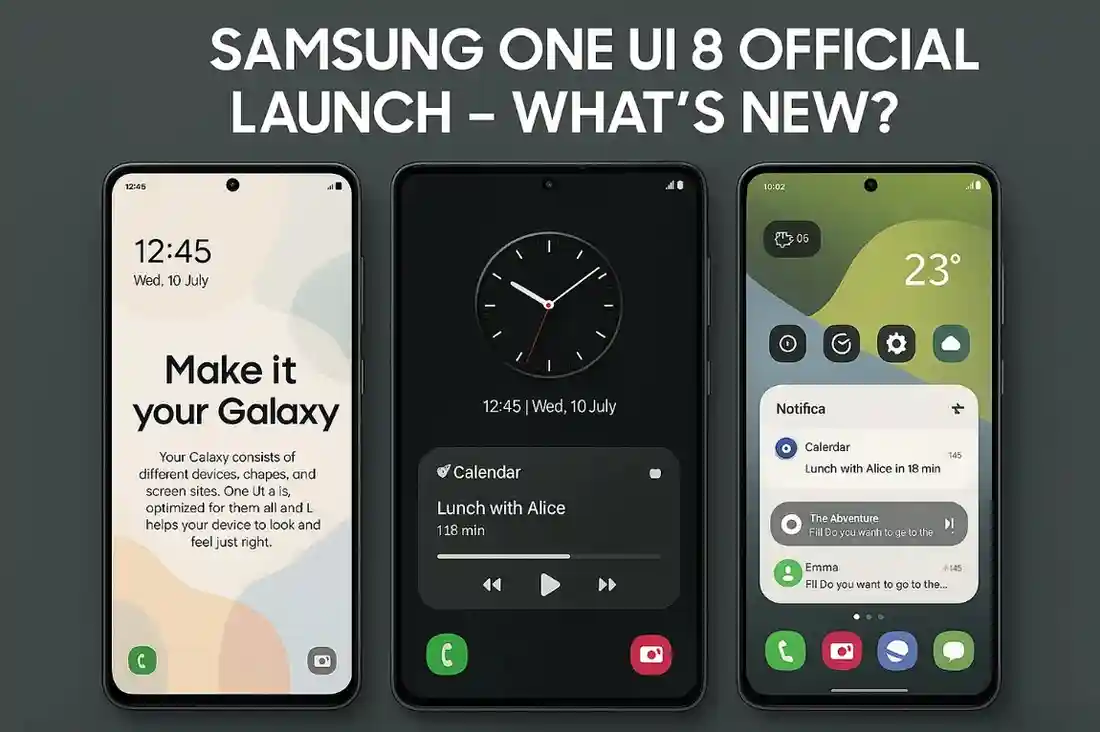
The enhanced Now Bar is more powerful than ever; as a result of the new features it has, you can interact with third-party apps in real time. On the Galaxy Z Flip’s Flex Window, the app activity and progress of the media player are shown directly. Now Brief provides a convenient daily digest to the user that may consist of traffic updates, reminders, and Samsung Moments, i.e., users reflecting on their daily routines and getting personalised music and video recommendations based on subscriptions and interests.
Gemini Live Integration Enhances Communication
One UI 8 incorporates Gemini Live, a functionality that makes interaction real-time, multimodal, and more user-friendly with the help of screen sharing and image uploading. The AI assistant introduced here can study the digital content and give the accompanying instruction, thus making the entire process of going digital more logical and faster than before.
Enterprise-Grade Security Architecture
This new version of the One UI has several vital security features that make it the most reliable smartphone operating system for AI-infused usage.
Knox Enhanced Encrypted Protection (KEEP)
Perhaps the main security feature of the Knox Enhanced Encrypted Protection (KEEP) is the creation of encrypted and secure storage spaces that are app-specific and are located within the device’s safe zone. The layout hence ensures that each application is able to have access to the private data it holds only; thus, data isolation at the unprecedented level is provided for AI-powered features such as Smart Suggestions, Now Brief, and Smart Gallery search.
Advanced Knox Matrix Protection
The advanced Knox Matrix ecosystem can secure users through any interconnected Galaxy device that is under the Knox system. In such a case, the system will automatically perform sign-outs from the Samsung account, disconnect cloud-connected services, and preemptively notify all connected Galaxy devices, with detailed guidance on the protective measures to be taken if severe security threats are found.
Quantum Resistant Network Security
As a part of future preparedness, One UI 8 has Secure Wi-Fi, which uses Post Quantum Cryptography (PQC) as an encryption technique that is resilient against quantum computing attacks. The security solution, which comes with the Auto Protect function, allows the users to secure their Wi-Fi connection while in a public area automatically, and the other, Enhanced Privacy Protection (EPP), protects internet traffic by wrapping the traffic in layers of encryption.
User Interface and Experience Improvements
Sophisticated Visual Design
Aside from adding new features, the primary goal of the One UI 8 has also been to soften and streamline the overall experience by implementing some of the visual and component blending techniques. The redesigned Quick Panel has thin borders around tiles that follow the frosted glass design concept and also contribute to the overall interface beauty.
Advanced Multitasking Features
One of the new features of the multitasking system is the flexible 90:10 split-screen ratios, which enable users to reduce the screen size of one application to only 10% of the display and still have full functionality. The improvement makes multitasking through email management, note taking, or chat threading, parallel to primary applications, really useable.
Camera and Media Just Like a Pro Enhancement
Portrait Studio Grows to More Subjects with Creativity
Portrait Studio from One UI 8 is no longer limited to only human subjects but has been extended to pets also. Users can now add artistic effects to pictures of dogs and cats, and the effects include fisheye lens, oil painting, and various other art-inspired designs.
Real-Time Audio Processing
The improved Audio Eraser is not only available in the Gallery but also works alongside the Video Player, Samsung Notes, Voice Recorder, and Phone. This instant noise-cancelling device will lower the volumes of the wind and the background noise so that the user can hear the important audio content clearly.
Advanced Camera Controls
In addition to new gesture controls, Samsung has redesigned camera operation to be more convenient and efficient. Users can swipe up or down anywhere on the camera screen to quickly switch between camera settings, and that is why this upgrade makes the process of taking photos more intuitive and efficient when it is a crucial moment.
Redesigned Samsung DeX Experience
Android Native Desktop Mode
Rather than the traditional way, Samsung has remade DeX in One UI 8 from a custom implementation to Google’s native Android Desktop Mode. This basic change in architecture not only helps with better compatibility but also with lighter weight and smoother performance across external displays.
Professional Display Features
The upgraded DeX allows for WQHD resolution and has extensive options of display rotation, such as 90, 180, and 270 degree orientations. Besides, users can put widgets on the home screen and utilise an absolute full-screen mode for applications with the taskbar and window headers not being visible by default for better viewing.
Device Compatibility and System Requirements
One UI 8 is compatible with numerous Galaxy devices; more than 50 models can be updated. The full compatibility roster consists of the flagship Galaxy S series from S22 onwards, all recent Galaxy Z Fold and Flip models, and the Galaxy Tab S8 series and newer, along with a variety of Galaxy A series devices.
There are no particular hardware requirements that have been set besides the general conditions for the update: enough free space on the device and the device being eligible according to Samsung’s update policy. The users should make sure their devices are sufficiently charged and have a stable internet connection for downloading and installing the update.
Looking Ahead: One UI 8.5 Innovations
Samsung is not waiting to launch One UI 8.5, which is supposed to bring even bigger improvements. The first leaks are suggesting that the Quick Panel controls will be totally customisable, the stock apps will be redesigned, and the camera will have a lot more functions, including the support of LUT for video editing. One can only take these forthcoming features as a sign of Samsung’s never-ending march towards perfection and user experience upgrades.
The official launch of One UI 8 is known as Samsung’s most daring software update ever, putting a spotlight on AI-driven features that require little to no compromise in terms of security and other qualities, while also showcasing a beautiful UI design. With the ongoing rollout in various countries until the end of 2025, the transformation is what Galaxy users will be witnessing, which ultimately leads to having a whole new standard being set for smartphone software innovation.