⚡ How to Speed Up Your WordPress Fast: 7 Surefire Tips for 2026 🚀
Any high-performance website needs to be fast enough to appear at the forefront of popular modern search engines. A slow WordPress engine poisons the reputation of the entire site, significantly lowering its overall conversion rates. You need to optimize the server-side of your solution in order to get the most out of it during 2026. Several essential modifications can have a noticeable impact on the overall speed of the WordPress core. This ultimate guide shares effective ways to make your engine respond faster.
Today’s modern users expect websites to be fast enough to satisfy their increasing demands for instant answers. They are not willing to wait a second for the page to load after clicking the link. Search engines constantly prioritize websites that use a faster server-side backend to host their solutions. It becomes critically important to implement a series of performance-enhancing techniques right now. Let’s take a closer look at seven essential tips that will help you speed up WordPress.
🚀 Seven Essential Tips On How to Boost Your Speed Right Now 📈
The first thing you need to do is choose the best managed web hosting companies of 2026. A reliable server-side solution will be able to handle increased server loads better. The next step is to make sure your WordPress core has an effective caching plugin installed and configured. It is a must to optimize static content delivery in order to reduce overall server bandwidth consumption. Caching plugins at the server-side allow you to make your web pages lighter than ever.
Table of Contents
Do not forget to optimize your media content before publishing any new articles or web pages. Modern WebP image formats compress the content perfectly for you. You should also consider adding a content delivery network plugin for WordPress. A well-configured CDN will cache all of your static content and media files so they can be delivered faster to your customers.
It is also a good idea to keep your database clean enough. The last thing you need to do is defer JavaScript delivery as much as possible. Small delay tactics can be used when it comes to JavaScript and jQuery plugins. You need to remove any unnecessary extensions that WordPress uses daily. It will significantly reduce the overall number of external requests made by your web application. All such optimizations will make your website faster and more efficient than ever.
💡 Optimization Tips That All Website Owners Need to Implement Today ✔️
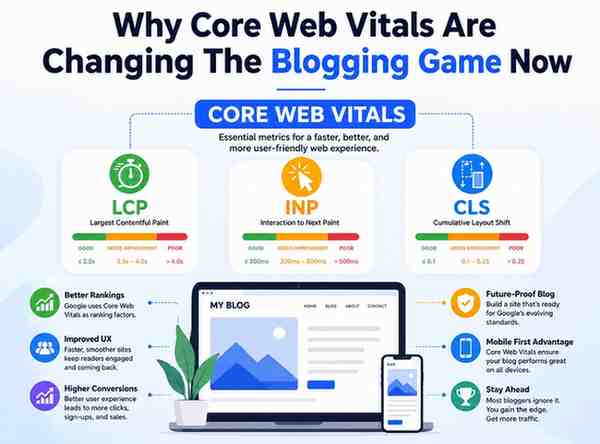
The Core Web Vitals are a set of metrics that define how a user-facing website is performing. They are also extremely helpful when it comes to optimizing the Largest Contentful Paint metric. You can speed up your WordPress core by providing the best possible server response time right now. Another effective way is to minimize the overall time between the initial user click and the next user action. It is also extremely important to reduce the overall CLS score. All such optimizations will give you a clearer idea about what to focus on first when speed optimization is concerned.
After implementing all of the tips and tricks mentioned above, it is time to take a closer look at the resulting performance benefits and improvements. The table below provides a clear breakdown of the expected performance increases. Each optimization tip is shown alongside actual measurements that prove the correctness of the provided recommendations. You will see that the combined effect of all such modifications is extremely significant. The final result can be seen as the overall performance speed increase.
| Optimization Strategy | Average Speed Impact | Implementation Effort |
| Managed Hosting Upgrade | 50% Load Reduction | Low Effort |
| Caching Plugin Setup | 40% Faster Load | Very Low |
| WebP Image Compression | 30% Size Decrease | Low Effort |
| Global CDN Integration | 35% Latency Drop | Medium Effort |
| Database Cleanup Script | 15% Database Boost | Low Effort |
🛠️ Core Modifications needed to Boost Your Google Scores 📊
You need to minimize the overall size of your Cascading Style Sheets (CSS). This is especially true for critical CSS used across all of your web pages. You should always try to concatenate your code as much as possible. Modern browsers can download multiple compressed web pages much faster than ever. It is easier for them to parse the resulting code because it does not contain any unnecessary garbage information. You will definitely want to keep your CSS files small enough so that smartphones do not spend too much time parsing them.
You have to enable GZIP compression at the server side. Compressed versions of your web pages do not consume as much memory as their non-compressed alternatives. Enabling the GZIP compression is usually not considered an extremely difficult task. Most modern web hosting companies give you the option to configure compression on their own. It is always a good idea to verify that the GZIP compression feature is working correctly.
You have to optimize background processes that consume your server’s CPU memory. It is a good idea to minimize the number of API background calls such processes are making. It will reduce the overall load on your WordPress engine. You will also see that background server processes are much faster than ever. You do not want to jeopardize the stability of your website just to provide additional speed. The less memory your background server consumes, the better.
Finally, you need to remember to test your engine speed often enough. It is always a good idea to keep track of all such modifications. You will see that the overall improvement is happening pretty fast. All such changes will help you keep your WordPress engine clean and responsive enough. Speed optimization is an absolute priority in 2026. You need to apply seven easy tips right now. A fast website is always in the best position to rule the search engine results.
#WordPress #WebDevelopment #Blogging #SEO #WebDesign #WebsiteDevelopment #WordPressPlugins #CMS #BloggingTips #DigitalMarketing