Samsung RAM Plus Exposed: The Pros, Cons and Best Use
One of the most debated memory management options that comes with Samsung’s RAM Plus feature has been the main talking point in various forums and social media posts. This would be a boost for your device, as it uses some of your internal memory to act like extra RAM. Admittedly, it sounds pretty awesome, but the truth is much more complicated and quite far from what Samsung is claiming.
What exactly is Samsung RAM Plus?
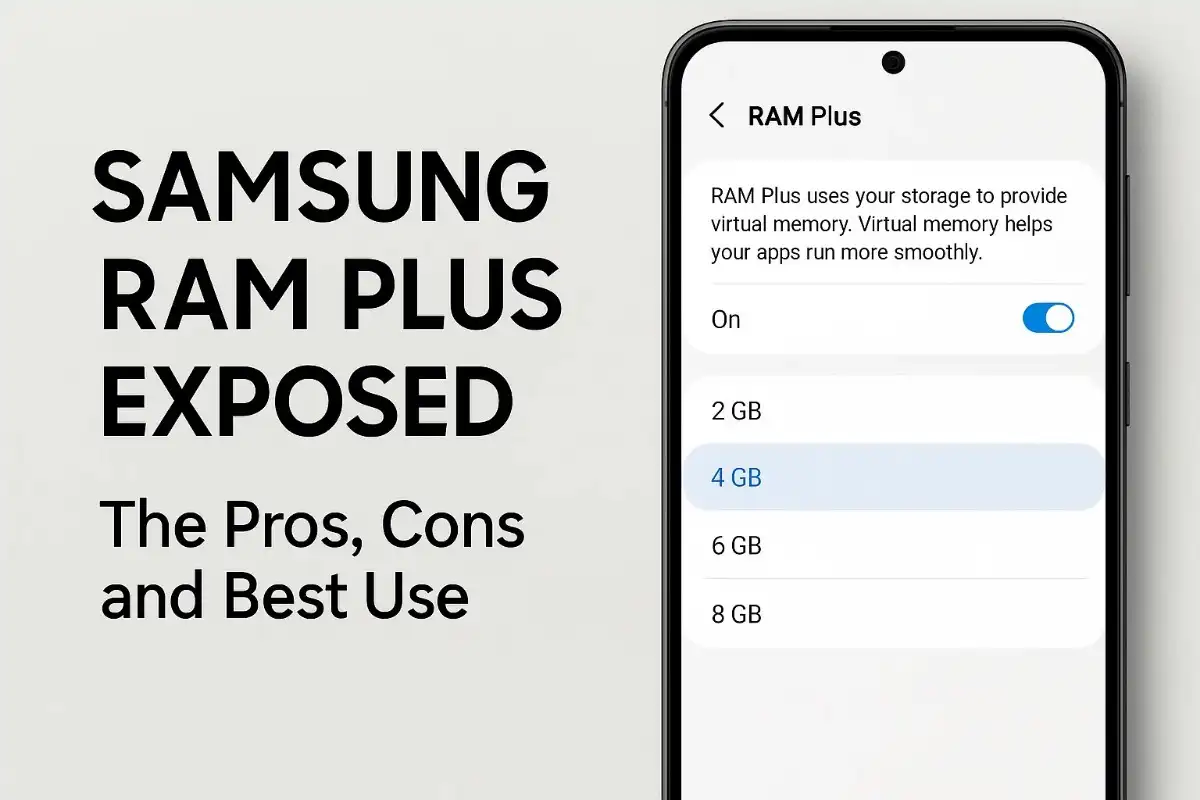
RAM Plus is a memory virtualisation solution where Samsung converts a specific chunk of the phone’s built-in memory into a “virtual” RAM. They started this feature in 2021 with One UI 4.1; it was smart in the sense that it selected from 2GB to 8GB of storage (with the One UI 8 developments expanding this to 12GB) as the allocation that could act as extended memory.
It borrows the same idea as PC swap files, where data from the physical RAM is moved to storage temporarily if the memory is getting full. Samsung calls it “intelligent memory expansion”, which, as they say, would allow you to keep more apps open in the background and enhance your multitasking skills.
Table of Contents
The Hidden Performance Reality
The Speed Contradiction
Contrary to what Samsung promises, RAM Plus in a lot of cases leads to a slowdown of the device rather than an acceleration of its capabilities, as is evidenced by many independent experiments. The root cause of the problem is constituted by the vast difference in speed between physical RAM and storage:
- RAM is accessed in nanoseconds.
- While internal storage is accessed in milliseconds
Thus, the process of data retrieval is hundreds of times slower if the data is stored in virtual RAM than if it is kept in physical RAM. The tests done by Android Police on different Galaxy models, including the Exynos-based S22 Ultra and the Snapdragon-based Galaxy S20, have shown that RAM Plus being turned on results in performance degradation in all cases.
Real-World Performance Impact
There are several reports by users indicating that while RAM Plus is on, they experience a 1-2 second delay going from one resource-intensive application to another, for example, when exiting a game and opening the camera. Although the performance of heavy apps is highly affected, the usage of light social media apps is not noticeably slowed down.
The Comprehensive Pros and Cons Analysis
Advantages of RAM Plus
- Expanded Multitasking Abilities: The only real positive provided by RAM Plus is that it leaves more apps running in the background aside from those that are specifically memory intensive. The elimination of frequent app reloads can be considered the main benefit, particularly for business users comprising various productivity application-based workflows/activities.
- Background App Persistence: Those pretty, graphics-heavy, long-loading-time games can always be kept suspended in virtual memory, allowing the user to continue exactly from the point where they left off after a long break.
Major Drawbacks
- Slower System Performance: Virtual memory is by nature much slower than physical RAM, resulting in slowdowns noticeable throughout the whole system whenever accessed.
- Device Storage Lifespan Reduction: The storage inside your device, which has not been designed for the operations that require frequent writing/reading cycles similar to RAM ones, can eventually age and become your device’s storage lifespan over time.
- Battery Consumption: More energy is needed for memory compression, data swapping, and storage access, thus increasing power consumption.
- Less Storage Space Will Be Available: Storage space that is allocated permanently for virtual RAM cannot be used for files, pictures, videos, and apps.
- Inefficiency of the System: Extra CPU resources are consumed on the compression and decompression stages.
Best Use Cases and Recommendations
When RAM Plus Makes Sense
- Budget Devices with Limited RAM: RAM Plus is a good idea for Galaxy devices with 4GB or 6GB of physical RAM, where memory limitation is really the bottleneck of performance.
- Heavy Multitaskers: Users who are constantly handling 10+ apps at the same time and like that apps remain active rather than that the device performs at its highest may get some benefit from moderate RAM Plus settings.
When to Disable RAM Plus
- Flagship Devices: Galaxy S23 Ultra (12GB RAM), S23/S23+ (8GB RAM), and other similar high-end models can hardly reach an out-of-memory situation. RAM Plus is thus a tool without meaningful benefits for these devices and possibly leads to lowered performance.
- Gaming and Performance-Critical Users: Any person who is mainly concerned with quick app switching, game performance, and system responsiveness should turn off RAM Plus.
- Storage-Conscious Users: People who care much about the storage lifespan or want to have the maximum available space should discontinue the use of this feature.
Optimal Settings Guide
Recommended Configurations
- High-End Devices (8GB+ RAM): Disable RAM Plus all the way. Only practically all cases are covered by the physical memory of these devices.
- Mid-Range Devices (6-8GB RAM): Restrict the RAM Plus to 2GB maximum. This allows for multitasking advantages without the heavy performance costs.
- Budget Devices (4GB RAM): RAM Plus with 4GB can be good, but you should watch it to make sure it is not deteriorating your performance and scale it back if it is.
How to Optimise RAM Plus Settings
Go to Settings > Battery and Device Care > Memory > RAM Plus. The users can choose from Off, 2GB, 4GB, 6GB, 8GB, and for the latest One UI 8, 12GB. The device must be rebooted for the changes to take effect after the modification of settings.
The Technical Truth Behind Virtual Memory
Samsung’s RAM Plus is a combination of zRAM compression and storage-based swap space. The data is compressed roughly at a 2:1 ratio before being put into virtual memory. Unfortunately, this compression/decompression process does impose computational overhead that can affect the overall performance of the system.
Advanced user testimonies say that even after turning off RAM Plus through settings, the virtual memory may still be used, as Samsung keeps around 3GB of zRAM, which is not affected by user settings. This indicates that the feature is partially implemented at the system level without any user control.
Industry Context and Alternatives
Virtual RAM isn’t only for Samsung. Xiaomi brands it as “Memory Extension”, OnePlus calls it “RAM Expansion”, and Realme markets it as “Dynamic RAM Expansion”. Nevertheless, Samsung’s approach appears to be more aggressive with its default settings than that of its competitors.
True performance improvement seekers may consider the following alternatives: lowering background app limits via developer options, using Samsung’s Memory Guardian app with Quick Switching mode, or just practising good storage hygiene.
The Verdict: Marketing vs Reality
Samsung RAM Plus perfectly fits into the category of feature marketing that greatly exaggerates the limitations of technology. While the concept of virtual memory finds legitimate uses in computing, smartphone implementations very often induce more complications than those it solves for modern devices with enough physical RAM.
This feature is mainly used to promote Samsung’s marketing story of giving “12GB” devices (8GB physical + 4GB virtual) to the consumers rather than actually making the user experience better. In general, for most Galaxy users, especially those who have flagship or recent midrange devices, turning off RAM Plus will probably lead to higher overall performance, longer battery life, and less storage wear.
In short, if you are using a low-end device with very limited RAM or require that your apps remain active at all times more than performance, then Samsung RAM Plus should be turned off to get the best result. The performance improvements that come from removing virtual memory bottlenecks are far more than any multitasking benefits for a large number of users.